The way people connect their smartphones to mobile networks is changing rapidly. Traditional physical SIM cards have been a standard part of mobile communication for decades, but eSIM technology is making it possible to activate cellular service without inserting a small plastic card into a phone. For iPhone users, this transition can make switching carriers, managing multiple numbers, and activating a new mobile plan considerably more convenient.
If you have recently purchased an iPhone that supports eSIM, you may be wondering how the process works. The good news is that learning Cómo activar una eSIM en iPhone is generally straightforward. With the right carrier information and a compatible device, you can complete the setup digitally and start using your cellular connection without handling a physical SIM.
What Is an eSIM and How Does It Work?
An eSIM, or embedded SIM, is a digital SIM built directly into a compatible smartphone. Unlike a traditional SIM card, it does not need to be physically inserted or removed. Instead, your mobile carrier provides a digital cellular plan that can be downloaded and activated on the device.
The eSIM stores the information needed for your iPhone to connect to a mobile network. This means that changing a mobile plan can often be done through software rather than replacing a physical card.
One of the biggest advantages is convenience. There is no tiny card to lose, damage, or incorrectly insert. An eSIM can also make it easier to maintain more than one cellular plan when the iPhone and carrier support multiple lines.
Check Your iPhone Before Starting
Before beginning the activation process, make sure your iPhone supports eSIM functionality. Many newer iPhone models support eSIM, although exact capabilities can vary depending on the model, region, and carrier.
You should also make sure that your iPhone is running a reasonably current version of iOS. Updating the operating system before activating a new cellular plan can help prevent compatibility problems.
Next, contact your mobile carrier or check its official instructions to confirm that your plan supports eSIM. Some carriers provide a QR code, while others allow activation directly through their app or by transferring a cellular plan from another iPhone.
It is also important to have a reliable Wi-Fi connection available during setup. The iPhone may need internet access to download and activate the cellular plan.
Prepare Your eSIM Activation Information
Your carrier will normally provide the information required for activation. Depending on the provider, this might include a QR code, activation details, a carrier app, or an option to transfer your existing number.
If you received a QR code, keep it accessible on another device or in printed form so your iPhone can scan it. Some carriers may instead send activation instructions through email or text.
Before proceeding, confirm that the number you want to activate is associated with the correct account. If you are transferring an existing number, make sure you understand whether the old SIM will stop working immediately after the transfer.
Having your account credentials and carrier information ready can make the entire process faster.
How to Activate an eSIM on iPhone
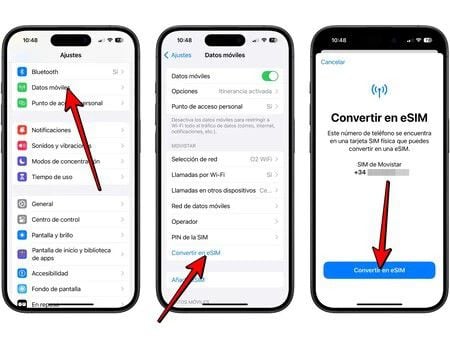
The basic process for Cómo activar una eSIM en iPhone begins with opening the Settings application.
Go to Settings and select Cellular or Mobile Data, depending on the language and regional configuration of your iPhone. Look for an option such as Add eSIM or Add Cellular Plan.
If your carrier supplied a QR code, select the option to use a QR code and point your iPhone’s camera toward the code. Follow the instructions displayed on the screen.
Your iPhone may ask you to confirm the cellular plan. Review the information carefully before continuing. If you are adding a second line, you may also be asked to choose labels such as Personal or Business so that you can easily identify each number later.
Once the carrier plan has been downloaded, your iPhone should begin connecting to the mobile network.
Activating an eSIM Through a Carrier App
Not every carrier uses QR codes. Some mobile providers allow customers to activate eSIM service through their official applications.
If this option is available, download the carrier’s app from the App Store and sign in to your account. Look for an option related to eSIM activation, changing your SIM, or adding a cellular plan.
The app may guide you through verification before automatically installing the eSIM profile. Follow every instruction carefully and avoid closing the process prematurely.
Carrier-based activation can be especially convenient because the app may automatically associate the eSIM with your existing account and phone number.
Transferring an eSIM From Another iPhone
If you are upgrading from an older iPhone, you may be able to transfer your cellular plan directly to your new device. Apple’s eSIM transfer features can make moving between compatible iPhones easier without requiring a new physical SIM.
During setup, look for the option to transfer a cellular plan from another nearby iPhone. Keep both devices close together, unlocked, and connected to the internet.
Follow the on-screen instructions and confirm the transfer when requested. Depending on your carrier, additional verification may be required.
Once the transfer is complete, test the new iPhone by making a call, sending a message, and checking mobile data.
Managing Multiple eSIM Plans
One useful feature of eSIM technology is the ability to manage multiple cellular plans on compatible iPhones. This can be helpful for people who maintain separate personal and business numbers or frequently travel internationally.
After adding multiple plans, you can assign labels to make them easier to recognize. You can also select which number is used for cellular data and which line is preferred for calls or messages.
For travelers, an eSIM can provide another convenient way to add a local or international data plan while keeping an existing number available, subject to carrier and device support.
Troubleshooting Common eSIM Problems
Sometimes an eSIM does not activate immediately. If this happens, first check that your iPhone has a stable internet connection and that Airplane Mode is turned off.
Restarting the iPhone can also resolve temporary network issues. You should then check the Cellular settings to see whether the new plan appears.
If the eSIM still does not work, contact your carrier. The problem could involve account activation, network compatibility, an incorrect QR code, or carrier restrictions.
Avoid repeatedly deleting and reinstalling an eSIM unless your carrier specifically instructs you to do so. Removing an active plan unnecessarily can make troubleshooting more complicated.
Why eSIM Technology Is Replacing Physical SIM Cards
The move toward eSIM technology is about more than convenience. Digital activation can simplify device manufacturing, reduce dependence on physical components, and make cellular-plan management more flexible.
For consumers, the biggest advantage is the ability to activate or change service without physically handling a SIM card. For travelers and people who manage multiple numbers, the flexibility can be particularly valuable.
As more smartphones and carriers adopt eSIM technology, the traditional SIM card may gradually become less important in everyday mobile connectivity.
Final Thoughts
Moving from a physical SIM card to an eSIM can initially seem unfamiliar, but the process is usually simple once you understand the steps. Check your iPhone’s compatibility, confirm eSIM support with your carrier, prepare your activation information, and follow the instructions under the Cellular settings.
Whether you are activating a new number, transferring an existing plan, or preparing your iPhone for travel, understanding Cómo activar una eSIM en iPhone can help you make the transition confidently. As digital cellular technology continues to evolve, eSIMs are becoming an increasingly practical alternative to traditional physical SIM cards.